
Choose by bottleneck
| Your recurring problem | Start with | Do not start here when… |
|---|---|---|
| Several assistants need the same MCP server configuration | MCP Servers for AI Assistants | You do not use MCP or already manage one stable config file. |
| A working tree mixes unrelated fixes and features | SmartChangelist AI | The diff cannot be sent to your selected model endpoint. |
| A RAG result looks wrong and you need to inspect stored points | Qdrant | Your vector store is not Qdrant or direct access is prohibited. |
| You want an assistant to write or explain code | Your existing coding assistant | These plugins support surrounding workflows; none is a chatbot. |
Worked example: split a fix and a feature into two commits — with a real demonstration and manual alternatives.
Configure one MCP server, then test it before sharing it
MCP Servers for AI Assistants provides one IDE interface for discovering, installing, editing, and inspecting MCP servers. It supports STDIO, SSE, and Streamable HTTP plus user- and project-level configurations for Junie, JetBrains AI Assistant, Windsurf, Firebender, Cursor, Claude Desktop, Claude Code, Continue.dev, and Codex CLI.
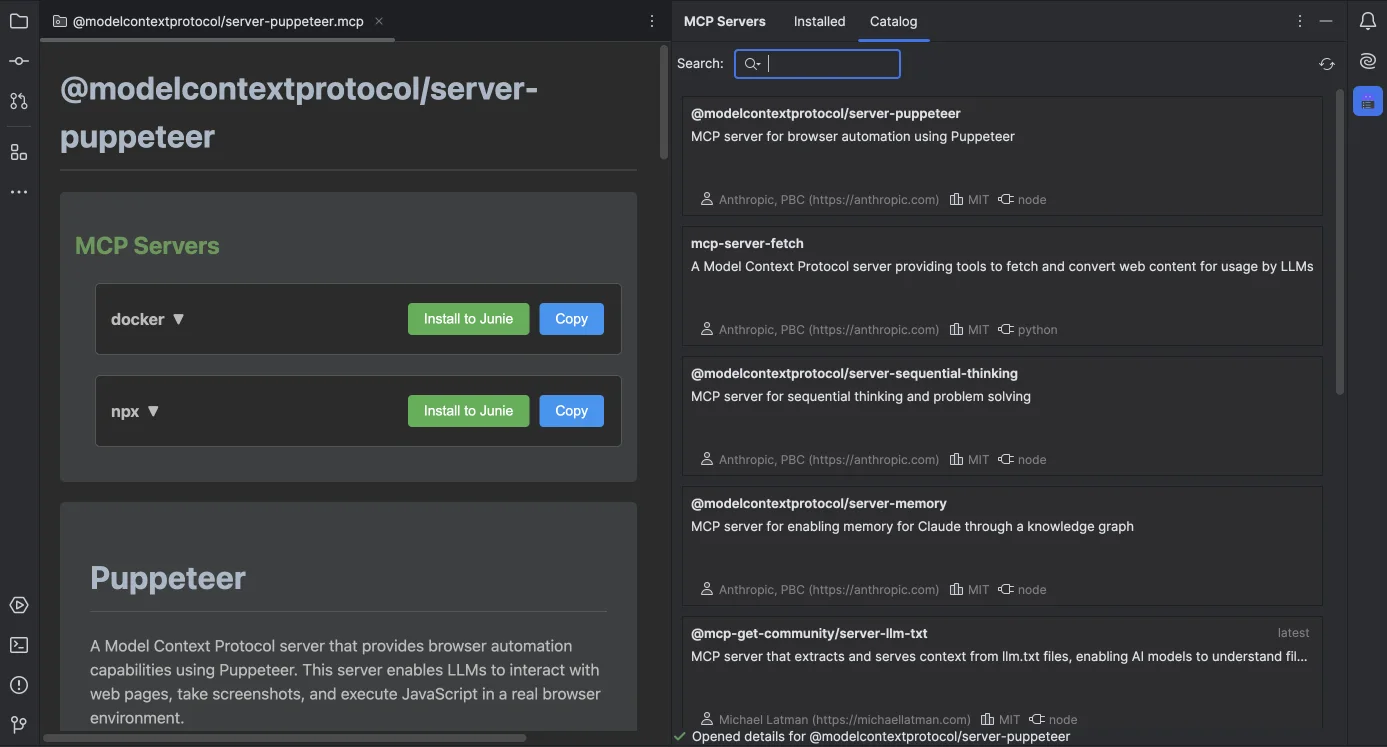
- Read the server metadata and source. An MCP server is executable code or a remote service; popularity is not a security review.
- Install to one project target first. Confirm the generated command, arguments, environment variables, URL, and headers.
- Use MCP Inspector. Connect, list tools, inspect their JSON schemas, and run a harmless call with representative input.
- Share only reviewed configuration. Team config can live in
.mcp/team.json; keep real secrets out of Git.
Catalog browsing requests package metadata from mcp-get.com. Installed STDIO servers run as local child processes with the environment you configure; HTTP/SSE servers receive requests and configured headers at their own endpoints. The plugin also writes selected assistant configuration files. Review each server's code, permissions, destination, and data policy separately.
The plugin does not sandbox an MCP server, audit its package, grant least-privilege credentials, or guarantee that every assistant supports the same transport and schema. Start with scoped credentials and a reversible test project.
Ask AI for a commit plan, then review the diff yourself
SmartChangelist AI reads the current changelists and their diffs, groups related files or hunks, and proposes conventional commit messages. It can use OpenAI, Anthropic, Gemini, DeepSeek, Ollama, LM Studio, or a custom OpenAI-compatible endpoint. The preview shows the proposed tree and a side-by-side diff before anything moves.
Keep the preview enabled during evaluation. Try a real but non-sensitive mixed change, check whether individual hunks stay semantically complete, and compare the proposed messages with the repository's conventions. The plugin records token usage and lets you cancel an active request.
File names and diff content used for grouping or message generation are sent to the LLM endpoint you select. Cloud providers receive that data under their own API terms; Ollama or LM Studio can keep the request on a local endpoint. API keys are stored in the JetBrains Password Safe. “Bring your own key” controls routing and billing—it does not make a cloud request local.
AI grouping does not prove that a commit builds, passes tests, contains no secrets, or has the right product boundary. Review the proposed hunks, run the repository checks, and use normal Git tooling for the final commit.
Inspect the stored point before blaming the retrieval model
Qdrant adds a database-style tool window for Qdrant collections: browse points with pagination, expose payload columns, build filters, run vector search or recommendations, inspect collection settings, and edit or export selected data. This is useful when a RAG answer is surprising and you need evidence from the underlying collection.
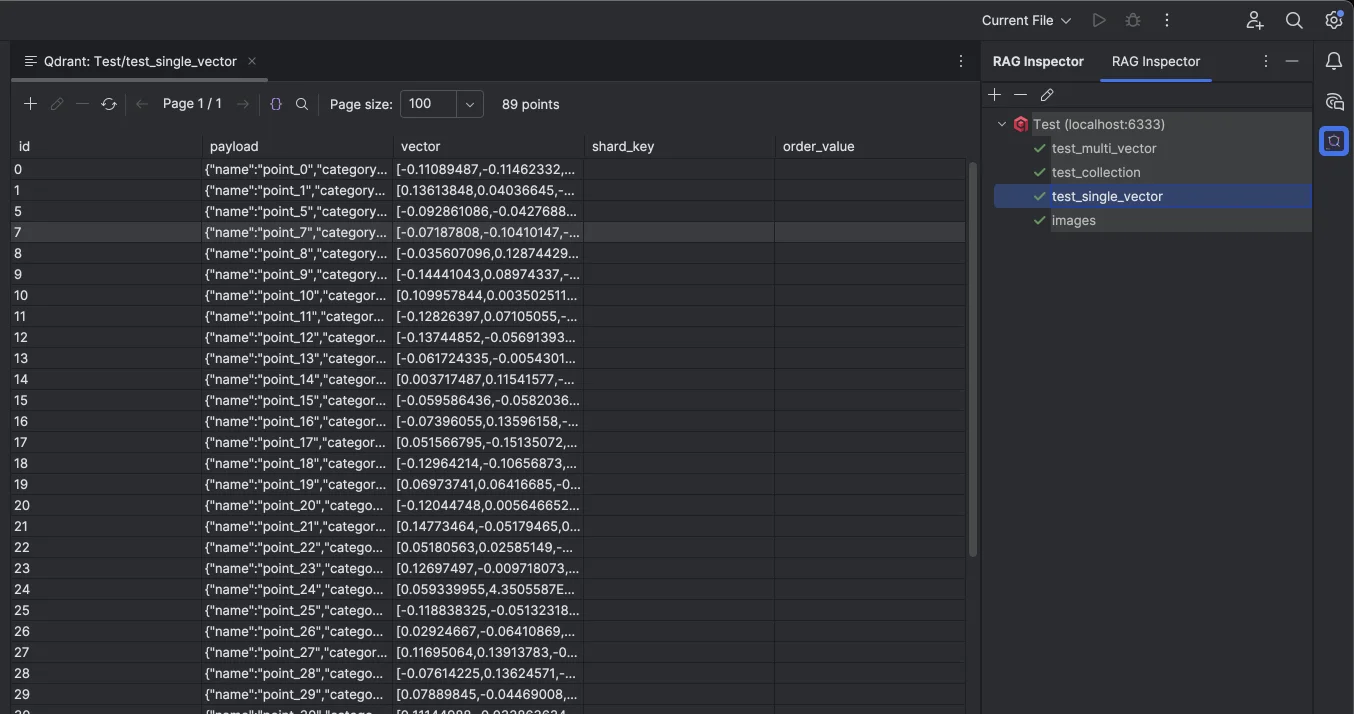
- Start read-only. Add the narrowest connection and open the suspect collection.
- Find the expected point. Filter by stable payload fields before comparing vectors.
- Reproduce retrieval. Run the relevant vector search or recommendation with the same scope.
- Separate storage from ranking. Check payload, vector name, dimensions, collection config, and application-side query construction.
The plugin connects directly from the IDE to the Qdrant URL you configure, whether that is localhost:6333 or a remote HTTPS endpoint. Browsing, search, edits, imports, and exports exchange collection data with that server. API keys are stored in the system credential store; exported connection JSON should still be reviewed before sharing.
Qdrant is not a tracing system, evaluation harness, embedding model, or access-control layer. A correct point in the database does not prove that the application embedded, filtered, ranked, or cited it correctly.
Free, trial, and pricing reality
MCP Servers for AI Assistants is freemium and currently includes a 7-day Pro trial. SmartChangelist AI and Qdrant are paid plugins with a 14-day trial. As verified on JetBrains Marketplace on August 14, 2026, each plugin is currently $2/month or $20/year for individual use in the United States. Regional, organizational, and discounted terms can differ. LLM provider usage and Qdrant hosting are separate costs.
Install one tool around one observable failure
Use MCP Servers when configuration drift blocks assistants, SmartChangelist when a mixed diff blocks review, or Qdrant when stored retrieval data blocks diagnosis. Keep it only if that loop becomes shorter without violating your data policy.