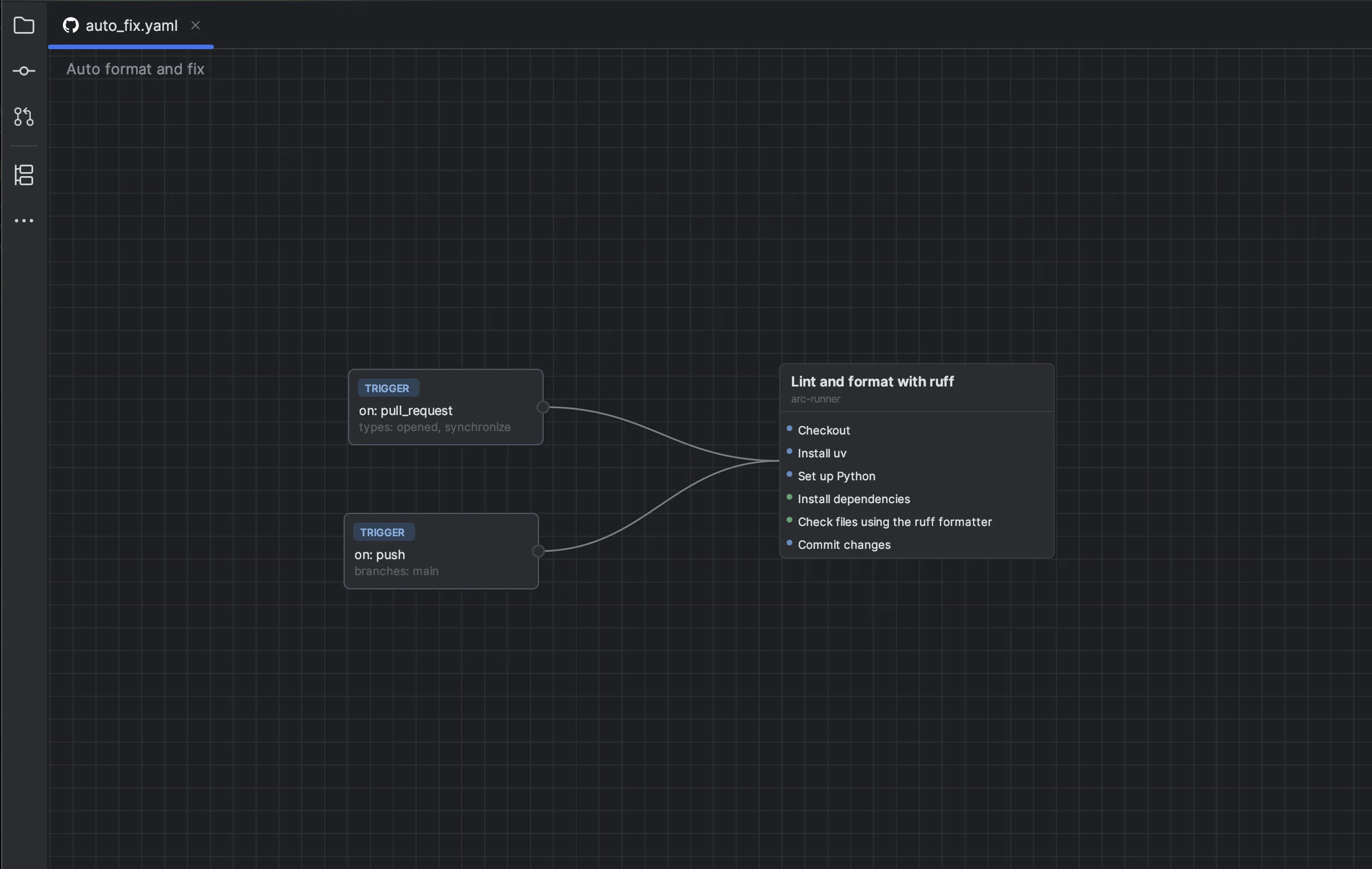
Review a complex workflow
Trace triggers, jobs, runners, steps, and dependency paths on one canvas before changing production automation.
 meanmail.dev
Turn workflow jobs, triggers, and dependencies into an interactive graph. Edit visually beside the YAML, then monitor recent runs without leaving your IDE.
Individual license: $2/month or $20/year after the trial.

Jobs become draggable cards, dependencies become edges, and workflow events become trigger nodes. Pan across large workflows, use the minimap, or persist a layout that makes sense to your team.
Split View synchronizes visual changes to YAML and YAML changes back to the graph in real time. You keep source control transparency while gaining a faster way to understand and reshape dependencies.
Trace triggers, jobs, runners, steps, and dependency paths on one canvas before changing production automation.
Connect jobs visually and let the plugin update the corresponding needs structure while the YAML remains visible.
Filter workflows and branches, inspect recent runs, auto-refresh, rerun failures, cancel work, or open the local workflow file.
Follow workflow references from uses and discover which local workflows depend on a reusable definition.
Pan, scroll, drag cards, use a minimap, and re-layout the graph.
See branches, paths, workflow inputs, and cron schedules at a glance.
Add, remove, and reorder jobs and triggers without losing YAML access.
Monitor recent activity and act on runs directly from the IDE.
Connect GitHub.com or GitHub Enterprise through OAuth Device Flow.
Use the workflow graph in both dark and light JetBrains themes.
Open a .github/workflows/*.yml file and the visual editor appears beside the YAML. Persisted layout keeps the canvas readable the next time you return.
Compatible with IntelliJ IDEA, Android Studio, and 13 more IntelliJ-based IDEs listed on JetBrains Marketplace.
Test the graph, split editor, reusable-workflow navigation, and Runs Tool Window before paying. JetBrains Marketplace manages the license.
Full access, no charge during the trial.
Flexible individual subscription.
Individual subscription with the annual discount.
Prices shown are the current US individual prices. Marketplace confirms regional, organization, and discounted pricing before purchase.
JetBrains Marketplace currently provides a 14-day trial with access to the complete Visual GitHub Actions plugin.
The current US individual price is $2 per month or $20 per year. Marketplace shows the applicable regional, organization, and discounted pricing before purchase.
No. Split View keeps the visual graph and YAML side by side with real-time bidirectional synchronization, so the workflow source stays visible and editable.
Yes. The plugin supports GitHub.com and GitHub Enterprise authentication through GitHub OAuth Device Flow.
Yes. The Runs Tool Window supports workflow and branch filters, recent run status, auto-refresh, rerun, cancel, and opening local workflow files.
Try the complete graph, YAML, and workflow-runs experience for 14 days.
Start 14-Day Trial