
Choose by bottleneck
| Your recurring problem | Start with | Why |
|---|---|---|
You mostly need readable nginx.conf files | Nginx Configuration | The free plugin covers highlighting, folding, and basic editing. |
| You review production Nginx changes | Nginx Configuration Pro | Adds security analysis, deeper inspections, navigation, and validation. |
| You repeat Docker and Compose terminal commands all day | Docker Manager | Keeps the live container tree, logs, inspect data, and actions together. |
| GitHub Actions YAML hides the pipeline shape | Visual GitHub Actions | Shows triggers, jobs, and dependencies as a synchronized graph. |
Review the Nginx change where you edit it
The fastest useful loop starts before nginx -t. Open the root config, follow every include, inspect upstream usages, and fix issues while the changed lines are still in context.
location ~ ^/(a+)+$ {
    proxy_pass http://$host$request_uri;
    add_header Access-Control-Allow-Origin *;
    add_header Access-Control-Allow-Credentials true;
}Use the free plugin when
You need Nginx file recognition, syntax highlighting, code folding, structure view, and basic completion. That is a sensible starting point for occasional edits and non-production examples.
Move to Pro when
You are reviewing configs that route real traffic. Pro adds 38 Gixy-parity security checks plus a separate ReDoS inspection, CVE advice, context-aware completion, cross-file navigation and refactoring, and an Nginx Operations window that can run nginx -t through a local binary or a running Docker container.
Nginx Pro does not deploy configuration or prove runtime behavior. A production change still needs version control, environment-specific validation, rollout safeguards, and monitoring. The nginx -t action also needs an accessible local binary or running container.
Run the Compose stack and keep the evidence beside the code
Once the config passes review, bring up the affected service, follow its logs, and inspect the container state. Docker Manager groups containers by Compose project and service and updates the tree as the runtime changes.
- Start narrowly. Run Up or Build for the changed service before rebuilding the whole project.
- Watch the live logs. Check highlighted warning and error lines while exercising the changed route.
- Inspect what actually launched. Confirm the image, command, environment, ports, mounts, networks, and raw inspect JSON.
- Clean up intentionally. Stop or remove only the selected container, service, or project after the check.
Docker Manager is for the daily local container loop. It is not a Kubernetes control plane, a remote fleet manager, or a substitute for repeatable Compose and deployment automation. A supported local runtime socket must be available.
Read the GitHub Actions pipeline as a graph, then verify the YAML
A workflow can be valid YAML and still be difficult to reason about. Visual GitHub Actions renders triggers as nodes, jobs as cards, and needs relationships as edges beside the source file. Changes synchronize in both directions.
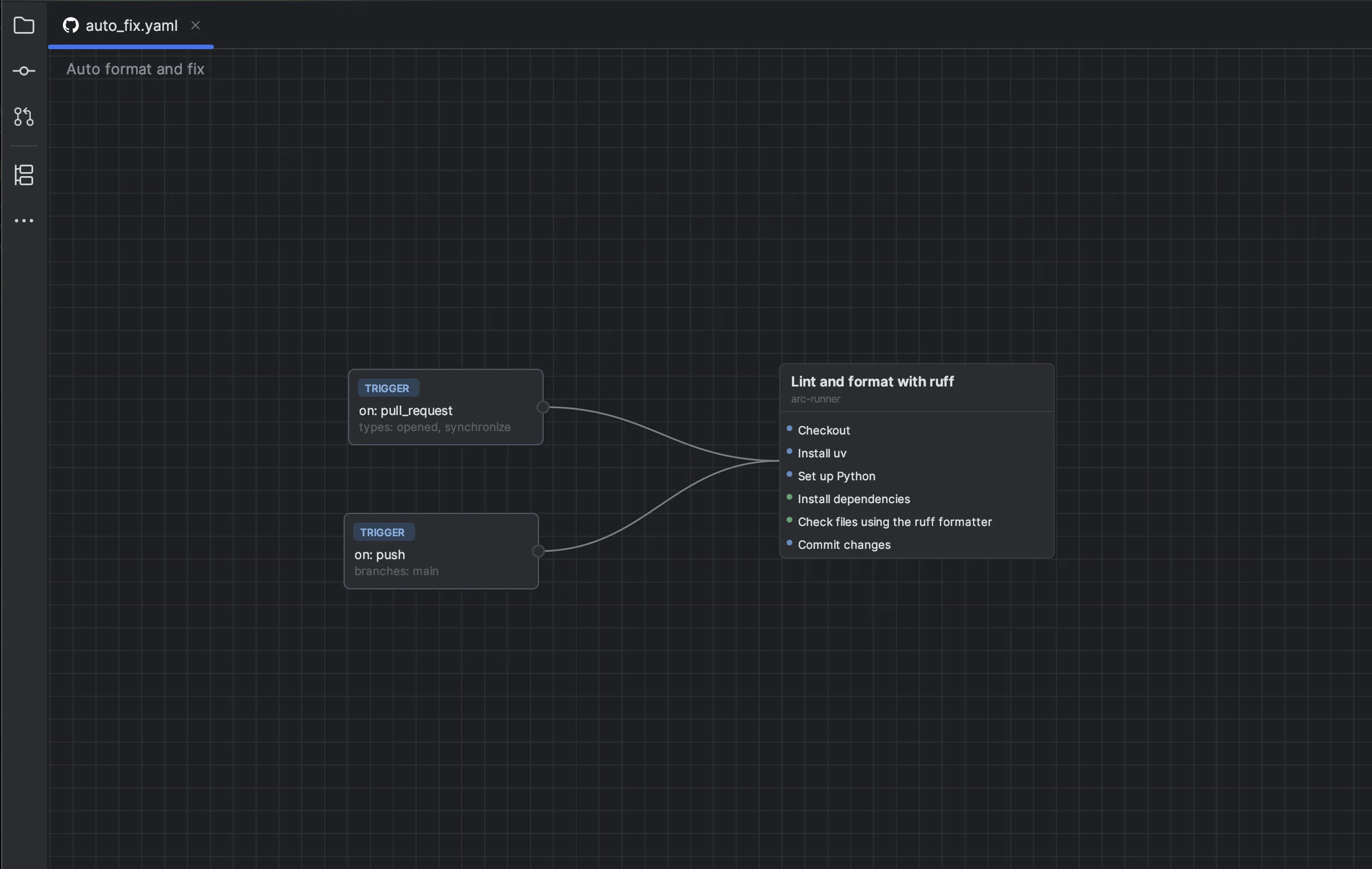
- Trace the critical path. Check which jobs block a deployment and whether a changed
needsedge introduces an unexpected sequence. - Review both representations. Use the graph for shape and the synchronized YAML for step definitions, expressions, and exact diff review.
- Check the run. Use the Runs Tool Window to filter by workflow or branch, refresh status, rerun, cancel, or open the local workflow file.
The repository YAML remains the source of truth. Keep using GitHub permissions and branch protection for control, and use YAML for detailed steps, advanced expressions, and matrix behavior. Run actions require a GitHub.com or GitHub Enterprise account connected through OAuth Device Flow.
How the three-plugin loop fits together
- 1Static review
Inspect Nginx structure, security findings, and references.
- 2Local runtime check
Build the service, exercise the route, and inspect logs and state.
- 3CI path review
Confirm the graph, source diff, and actual workflow run.
- 4Deployment and monitoring
Use your existing delivery platform, approvals, and observability.
Pricing and trial reality
Nginx Configuration is free. Nginx Configuration Pro, Docker Manager, and Visual GitHub Actions are paid plugins. Each currently has a 14-day trial; the current US individual price for each is $2/month or $20/year. JetBrains Marketplace shows regional, organizational, and discounted terms before purchase.
Install the tool closest to today's bottleneck
Start with one loop, measure whether it removes repeated terminal or browser work, and add the next plugin only when the adjacent handoff is the new bottleneck.