
Choose by bottleneck
| Your recurring problem | Start with | Why |
|---|---|---|
| Dense mathematical or boolean expressions are slow to scan | Prettify python | Shows familiar operators as compact mathematical glyphs in the editor. |
| Type hints contain redundant or outdated syntax | Python Annotations | Adds focused inspections and one-click fixes for typing constructs. |
| You need to understand what CPython compiled | Python Bytecode | Places synchronized disassembly beside the source file. |
| You need consistent source formatting | Ruff or Black | Formatting source is a different job from visual operator presentation. |
| You need framework-level Django navigation or commands | The Django workflow guide | Use the dedicated structure and management-command workflow. |
Make operators easier to scan without changing the file
Prettify python uses editor folding placeholders to present standard Python tokens as mathematical symbols. For example, >= can appear as ≥, != as ≠, lambda as λ, and -> as ➔. The document still contains ordinary Python syntax, so Git diffs, formatters, tests, and teammates without the plugin see the original tokens.
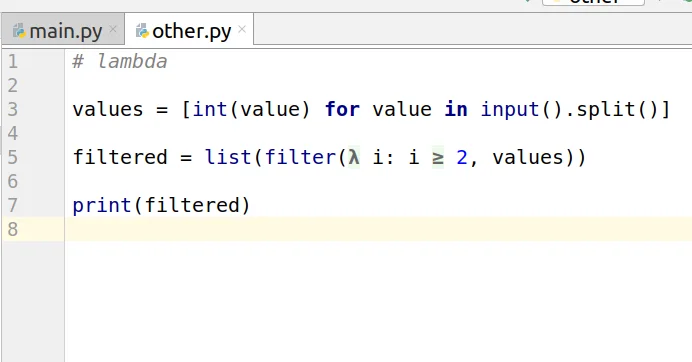
lambda and >= remain Python source while their folded presentation becomes compact.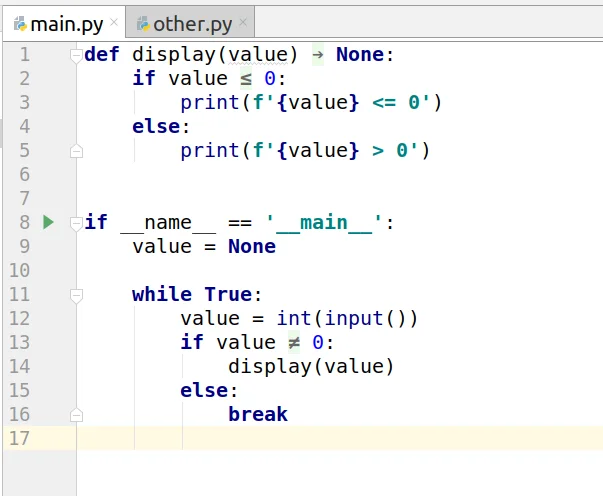
A low-risk evaluation
- Start with the defaults. Open a representative Python file and note which expressions become easier—or harder—to read.
- Disable ambiguous mappings. Keep only glyphs that are instantly recognizable in your font and domain.
- Check editing behavior. Move the caret through folded operators, copy code, and review the unchanged Git diff.
- Share the convention. Treat the plugin as a personal editor preference unless the whole team agrees on the visual vocabulary.
Prettify python is not a formatter, linter, parser, or refactoring engine. Use Ruff or Black for source formatting and your normal review tools for correctness. Glyphs can also reduce clarity when a font, accessibility setup, screen share, or teammate uses a different visual convention.
Modernize typing syntax only after choosing the target Python
Python Annotations provides 21 focused inspections with quick fixes. It can simplify redundant unions, flatten nested unions, remove duplicates, identify invalid forms, and convert between legacy typing syntax and modern pipe or built-in collection syntax.
Union[int, int, str]→ Union[int, str]Optional[User]→ User | NoneList[int]→ list[int]Syntax-conversion and advanced inspections are disabled by default. That is intentional: a correct modernization depends on the repository's minimum Python version, typing policy, and checker configuration. Enable a rule only after confirming those constraints, apply it to a small diff, then run the project's formatter, type checker, and tests.
Python Annotations does not prove type correctness and does not replace mypy, Pyright, Pyre, or the IDE's broader Python analysis. Its quick fixes rewrite syntax; your configured checker and runtime support decide whether the result is valid for the project.
Use bytecode to answer a narrow CPython question
Python Bytecode opens a split editor with source on one side and colorized disassembly on the other. Selection synchronizes in both directions, the output can follow the whole file or a specific function or class, and opcode documentation is available from the editor.
def total(values):
return sum(values)LOAD_GLOBAL sum
LOAD_FAST values
CALL 1
RETURN_VALUEIllustrative opcode shape; exact output depends on the selected Python interpreter version. The plugin renders the real local disassembly.
- State the question first. Compare two expressions, inspect a surprising construct, or learn how a specific statement compiles.
- Select the smallest scope. Choose the affected function or class instead of reading the entire module.
- Follow source-to-opcode highlighting. Use synchronization and opcode documentation to understand the sequence.
- Measure before optimizing. If the question is performance, validate the hypothesis with a profiler and benchmark.
The plugin supports Python 3.4 through 3.14, includes more than 170 opcode descriptions, updates after edits with configurable debounce, protects large files, cancels superseded processes, caches results, and exports bytecode to text or HTML. It compiles a temporary copy of the current document with the project's local Python SDK; it does not import or execute the module.
Bytecode is version-specific implementation evidence, not a portable Python contract. It does not replace a profiler, benchmark, debugger, or test suite, and a shorter instruction sequence does not automatically mean faster application behavior.
Where Django fits
These three tools operate at the Python language and editor level. If the bottleneck is tracing models, URLs, templates, migrations, or repeating manage.py commands, use the Django workflow guide instead of adding framework features to this checklist.
Free, trial, and pricing reality
Prettify python and Python Annotations are free; they do not require a paid subscription or trial. Python Bytecode is freemium and currently has a 7-day trial for its paid feature set. The current US individual price is $1/month or $10/year. Regional, organizational, and discounted Marketplace terms can differ.
Install one plugin for one repeated question
Choose visual presentation for scanning, annotations for deliberate typing cleanup, or bytecode for a concrete CPython investigation. Keep the plugin only if it removes more friction than it adds.